Guide: Prepare your Amazon Support Inbox for Black Friday With eDesk’s AI Agent
)
More orders bring more buyer questions: “Where’s my package?”, “Will this fit?” and “How do I set this up?”
eDesk’s AI agent can handle routine conversations using your product information, order context, and approved procedures, even outside working hours. Your team can then spend more time resolving the exceptions that need their attention and driving growth for the business.
Here’s a practical workflow using eDesk. Start now to get ready for peak shopping season.
1. Bring your Amazon messages into one inbox
Connect all your Amazon accounts to eDesk so your team can see buyer messages alongside the relevant order information. If you also sell through Shopify, eBay or other channels, you can easily connect those too.
Once connected, you’ll see complete context in your ticket view: order and customer information, and ticket history.
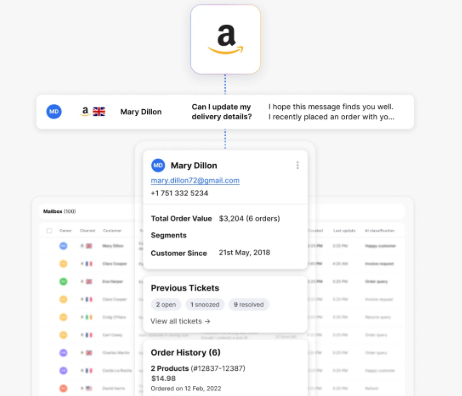 Why this helps: Less switching between accounts and searching for the information needed to answer a buyer. eDesk’s Amazon integration also includes SLA response timers to help your team prioritize approaching deadlines. And you can even cancel unshipped Amazon orders directly within your ticket in eDesk.
2. Pick three repetitive questions to automate first
Review 50–100 recent buyer messages—or last year’s Black Friday conversations—and count the questions that keep coming up.
Good starting points include:
Order-status questions: “Where is my order?” “Can you track my package?”
Product & troubleshooting questions: “Does this accessory fit model X?” “How do I assemble or activate this?”
Policy questions: “Can I get a refund?” “Do you ship to my country?”
Choose questions with clear answers and think about your company’s policies and procedures. Keep any unusual requests or very angry customers with your team for the first rollout.
Why this helps: You can start with a small, useful scope and expand after seeing the results.
3. Give the agent the information your best support colleague uses
In eDesk, organize your knowledge into three parts:
Add to eDesk | What to include |
| Training Content | Product specifications, compatibility details, manuals and troubleshooting steps. |
| Procedures | Current shipping, return and warranty rules applicable to the relevant Amazon marketplace and fulfilment method. |
| Instructions | How to respond, brand tone, what to avoid promising, and when to involve your team. |
Check seasonal information before uploading it. Keep guidance for Amazon orders clearly separate from your own website’s policies.
The AI Agent will use all information available to it, but it won’t guess or make something up – if it doesn’t know, it will escalate to a human agent.
Why this helps: The agent has specific information to work from. eDesk uses these content types alongside ticket and order context to prepare its answers.
4. Create your agent and give it one clear procedure
eDesk has pre-built procedures that you can start your AI Agent on, review these or create one from scratch. Select the Amazon channels it should cover and then turn the AI Agent on.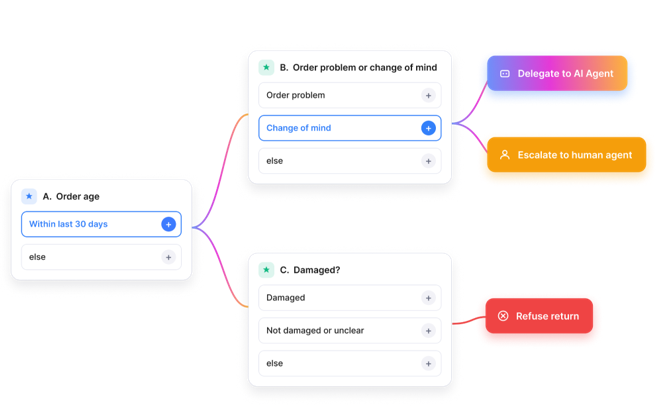 For example, a product compatibility workflow:
Identify the product and model the buyer is asking about.
Check the approved compatibility information.
Ask for the model number if it is missing.
Answer when the information supports a clear response.
Pass the conversation to a person if compatibility remains uncertain.
eDesk’s Agent can ask follow-up questions and continue the conversation when the customer replies.
Why this helps: The Agent can work through a routine enquiry, reducing the back-and-forth your team needs to manage.
5. Set the handoff rules before switching on automation
Decide which conversations should always receive human attention during your initial rollout.
For example:
Angry buyers or customers with several open tickets.
Conflicting order or product information.
Requests outside your approved procedures.
Use eDesk’s exclusions and instructions to define those boundaries. There are also options to set a send delay, and EU AI Act settings to let customers know they are interacting with AI.
Why this helps: Routine questions move faster while your team retains control over sensitive cases.
6. Improve and expand
Use eDesk’s Knowledge Gap and Procedure Gap reports to find information or workflows the Agent needs in order to automate more ticket volume.
Track performance of the AI Agent by tracking its resolution rate and contribution rate. And stay in control with full visibility of each step the AI Agent takes through the Activity Log.
Automating 300 enquiries that previously took five minutes each would recover 25 staff hours.
"The AI Agent has helped lower stress for our service team, and saved us money, by taking on our routine queries across over 20 of our channels."
- Stuart Haines, Managing Director of Trade Chem
Your first move: Pick one repetitive Amazon buyer question, give the AI Agent the information and procedure to handle it, and get it set up before your Black Friday promotion starts.
Explore eDesk’s eCommerce AI Agent
Watch: Onboarding your AI Agent - eDesk Demo
Author:
)