Multichannel eBay and Amazon Customer Service
Managing eBay, Amazon, and every other channel in one inbox
Most sellers don't run eBay in isolation. eBay sits next to Amazon, a webstore and smaller marketplaces, and a single platform can add several regional storefronts on its own.
That gap, between how many channels a seller actually runs and how many their support process was designed for, is where tickets get missed. This guide covers why that happens, and how to run eBay and Amazon customer service out of a single, unified inbox rather than a tab for each.
TL;DR
Sellers run more channels than most support setups are built for, once regional marketplaces, a webstore and smaller channels are counted.
Rank your own channels by ticket share and tickets per order before deciding where to staff.
Managing channels separately is what causes the misses, not channel count on its own: context-switching between logins is where response times slip on your heaviest channel while you're logged into a quiet one.
A unified inbox and a prioritization framework fix both problems, covered below.
Why eBay Rarely Stands Alone
A seller's channel count is higher than most expect, because a single platform can account for several connections on its own. eDesk's own integration directory lists Amazon as covering 21 separate Amazon marketplaces by country, and eBay across multiple regional storefronts too, before social, chat, and smaller marketplace connections are even counted.
So the list of channels next to eBay and Amazon is rarely all distinct major platforms. It's usually a mix of regional marketplace variants, a webstore, and a handful of smaller channels, each one generating its own ticket stream that needs a reply.
Which Channels Carry Most of the Load?
Your channels won't create equal amounts of support work. The quickest way to see where it sits is to rank your channels by their share of tickets over the last 30 days.
The top two or three are where a support team's attention should default to first. The rest still matter; they just come second.
Start for free and connect your own channels to see where your ticket concentration actually sits.
Why You Can't Staff Every Channel the Same Way
Ticket share is only half the picture. The other half is how much support load each channel generates per order, and that changes from one channel to the next.
Part of that comes down to who handles the buyer. On eBay, buyers contact the seller about their orders. On Amazon, with Fulfillment by Amazon, Amazon says it will "handle customer service and returns on your behalf." So the same number of orders can mean a very different support load on each channel.
A seller staffing eBay and Amazon with the same agent-to-order ratio will end up over-staffing one or under-staffing the other. There's no single ratio that fits both.
What Breaks When Channels Are Managed Separately
Channel count alone doesn't break a support operation. What breaks it is managing those channels from separate logins:
Context-switching costs time on your heaviest channel. An agent checking eBay, then Amazon Seller Central, then a webstore inbox, then a social DM queue, spends real minutes just navigating between tools, minutes that come straight out of response time on whichever channel actually needed them most.
Low-ticket channels get checked too often, high-ticket channels not often enough. Without a shared view of volume across channels, it's easy to default to checking one channel regularly because it's familiar, while a busier queue elsewhere backs up unnoticed.
Order and customer context doesn't travel with the agent. A separate login for each channel usually means separate access to order status, tracking, and customer history too, so every reply starts with a lookup instead of an answer.
Coverage gaps appear at the handoff points. When channels are split across different tools, it's harder to see which tickets are genuinely uncovered during a shift change or a busy stretch, versus which ones just haven't been checked yet.
None of this is really a channel-count problem. A seller running many channels through one shared view has a planning challenge; a seller running 3 channels through 3 separate logins has a worse operational one.
Running eBay, Amazon, and Everything Else From One Inbox
eDesk's unified eDesk inbox brings email, marketplace messages, webstore conversations, chat, and social messages into a single view, so eBay and Amazon tickets, and everything else connected, land in the same place instead of separate tabs. Order, customer, and shipping details show up inside each ticket automatically, pulled from the eDesk eBay integration, eDesk Amazon integration, eDesk Shopify integration, and the rest of eDesk's integrations hub, which covers 300+ marketplace, webstore, and social connections in total.
In practice, this is one shared queue inside eDesk: a Pre-sales question, an Order Query, a Cancellation, and a Returns Query, each from a different Amazon regional marketplace (the flags mark UAE, Australia, Sweden, and the UK), sitting in the same "To do" list with the same Marketplaces, Brands, and Channels filters available across all of them.
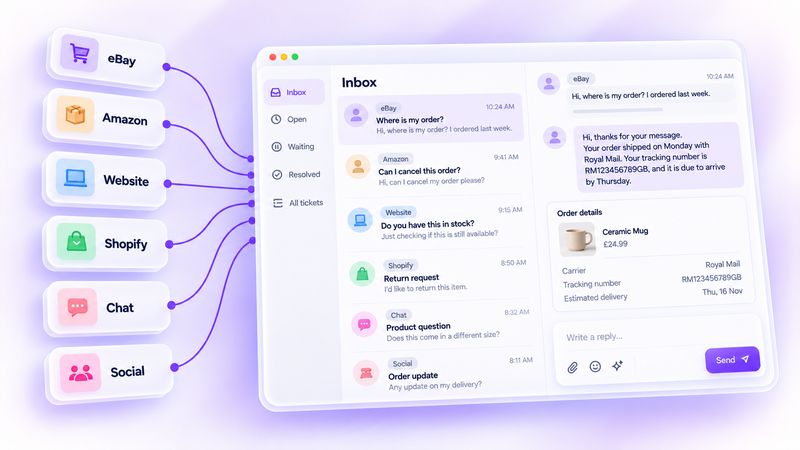 AI Agent sits on top of that same unified view, so automation rules can be applied consistently across channels instead of configured separately in each platform's own tools, which matters because each channel behaves differently.
A Channel-Prioritization Framework
Use your own ticket data as the inputs, not a staffing guess:
Rank your channels by ticket share first. Your top channels are where most tickets already land, and where a response-time miss costs the most in absolute terms.
Then weight by ticket intensity, not order volume. A channel with fewer orders but a high tickets-per-order rate needs proportionally more attention than its order count alone suggests.
Staff and automate the top two or three first. Cover the channels that carry most of your volume before the remaining channels are even considered.
Let the smaller channels run on shared rules, not dedicated headcount. The smaller channels in a many-channel setup rarely justify a channel-specific process; a shared inbox with consistent automation rules covers them without pulling focus from the channels generating most of the volume.
Frequently Asked Questions
1. Why does eBay need different support attention than Amazon?
Who handles the buyer. On eBay, buyers contact the seller about their orders. On Amazon, orders fulfilled by Amazon get customer service and returns from Amazon itself, so the same number of orders can mean a lighter load for the seller there.
2. Can I manage eBay and Amazon customer service in one inbox?
Yes. eDesk's unified inbox brings eBay, Amazon, webstore, chat, and social messages into a single view, with order and customer data pulled in automatically through each platform's own integration, so a seller doesn't need separate logins to reply across channels.
3. Should every connected channel get its own support process?
No. Rank your channels by ticket share first. The top two or three need the most attention; the rest usually run well on shared automation rules inside one inbox rather than a dedicated process each.
4. Does AI Agent work across multiple channels at once?
Yes. AI Agent sits on top of eDesk's unified inbox, so automation rules apply consistently across every connected channel rather than needing separate configuration inside each platform's own tools.
Where to Start
Pull your own ticket count by channel for the last 30 days and rank it the way the framework above does, by share first, then by intensity per order. That ranking tells you which one or two channels actually need the staffing and automation attention first, regardless of how many channels you're connected to in total.
Book a Free Demo and we'll map your own channel mix before you decide where to put your next hire or automation rule.
Author:
