Cancel Amazon Orders Without Leaving eDesk
)
Open the ticket. Switch to Seller Central. Hunt for the order. Cancel it. Switch back. Tell the customer it’s done. That’s the old routine, and it just got deleted.
Amazon order cancellations now happen right inside eDesk. See a cancellation request come in, handle it, and reply, all in the same ticket, without your cursor ever leaving the screen. Seller Central becomes optional for this one, not mandatory.
What’s new
Cancel unshipped Amazon orders straight from the Ticket view or the order screen, no browser-hopping.
One click closes the order and clears the ticket in a single motion.
Pick a reason from a short list, No Inventory, Buyer Cancelled, Shipping Address Undeliverable, Customer Exchange, or Pricing Error, submitted straight to Amazon.
Every cancellation logs an automatic internal note on the ticket, who did it, when, and why.
How to cancel an Amazon order in eDesk
Step 1: Open the order and click Cancel Order
Open the ticket for the unshipped order. In the Order Info panel on the right, you’ll see a Cancel Order button sitting right under the order number.
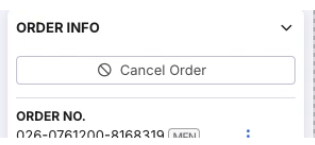
Step 2: Select a reason
A confirmation window opens and asks you to pick a reason. Amazon requires one, and it’s worth knowing upfront: the buyer may see whichever reason you choose.
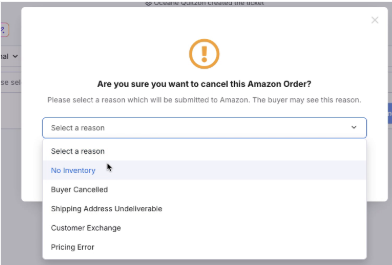
Step 3: Confirm the cancellation
With a reason selected, hit Cancel Order to confirm. No extra tab, no extra login.
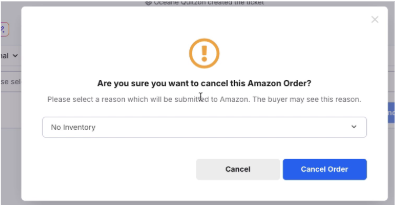
Step 4: Done, instantly
A confirmation pops up the moment it’s processed.
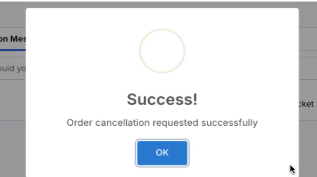
Step 5: The record stays on the ticket
eDesk automatically logs an internal note with who cancelled it, how, and why, so the full history is right there if anyone needs to check it later.

FAQ
How do I cancel an Amazon order from eDesk?
Open the ticket or order screen for the order you need to cancel. If it’s unshipped, you’ll see a cancel option right there, no need to open Seller Central separately.
Can I cancel any Amazon order this way?
This works for unshipped orders. Once an order has shipped, cancellation follows Amazon’s standard post-shipment process.
Will the customer be notified automatically?
The cancellation reason you select is submitted to Amazon, and Amazon may show it to the buyer, so it’s worth picking one that’s accurate and clear rather than a placeholder.
It’s live right now. Open a ticket for an unshipped Amazon order and the cancel option is already sitting there, waiting.
Can I cancel an order without a ticket?
Yes, you can. Just head to the order screen and cancel the order directly from there.
Can I refund an order?
No, but it’s coming soon!
Author:
)