eCommerce Live Chat Support: Why Chats Need Order Data

eCommerce live chat support answers shoppers while they are still deciding, and buyers while they wait for an order. Both only work if the agent can see the order, the product and the customer's history beside the chat. This guide covers the metrics, staffing maths and setup, with chat sitting in the same inbox as your email and marketplace messages.
TL;DR
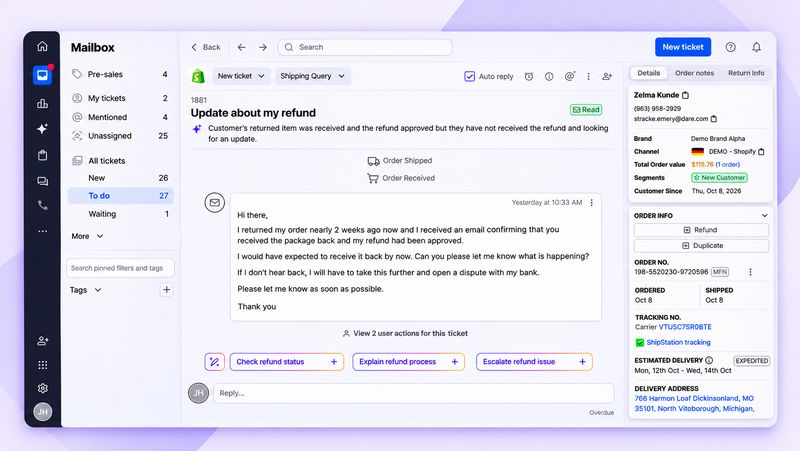
Put the order beside the chat. Agents should answer "where is it?" or "can I change my address?" without leaving the conversation.
Staff with a formula, not a guess. Peak chats per hour and concurrent chats per agent tell you how many people you need.
Measure sales as well as speed. Track how many chats are followed by an order, and what those orders are worth.
Running eCommerce live chat support well
Metric | How to calculate it | What it tells you |
| First response time | Time from chat start to first agent or bot reply, averaged | Whether shoppers wait |
| Average handle time | Total chat time/chats handled | Staffing needs |
| Resolution rate | Chats solved without a follow-up ticket / all chats x 100 | Whether agents have the data they need |
| Chat CSAT | Positive end-of-chat ratings / all ratings x 100 | How the chat felt |
| Chat-to-order rate | Chats followed by an order within your window / all chats x 100 | Sales influence |
Measuring revenue from chat
Chats in the period x share followed by an order within a set window x average order value of those buyers. For example, 1,000 chats a month, 12% followed by an order within 7 days, and an $80 average order value gives 120 x $80 = $9,600 of chat-influenced revenue. These are example inputs; use your own window and figures.
Order status in chat
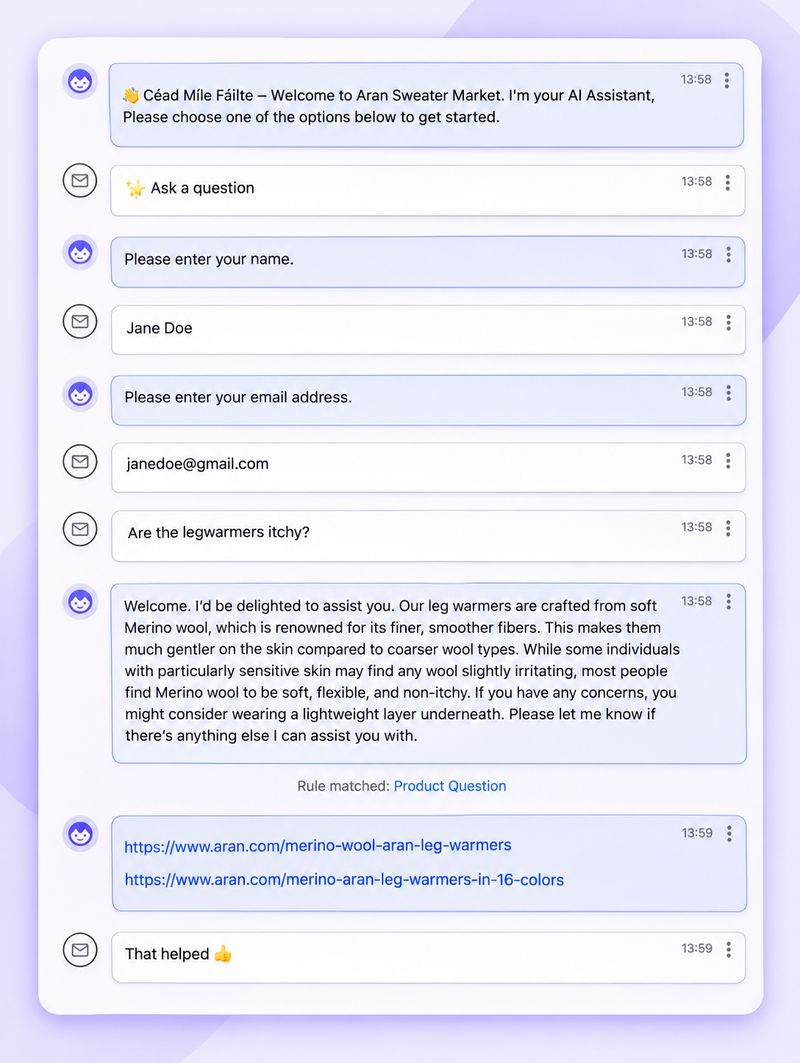
The shopper asks where their order is.
The bot or agent checks identity with the order number or email.
Tracking and the expected delivery date are returned in the chat.
If the parcel is late, lost or disputed, the chat hands over to an agent with the order attached.
Out of hours and missed chats
Show an auto-reply such as: "We're offline until 9am. Leave your email and order number and we'll reply first thing." Capture the contact as a ticket, and if no one accepts a chat within your set time, turn it into a ticket rather than leaving the shopper waiting.
Book a Free Demo to see chat, email and marketplace messages in one inbox, with the order beside each one.
 Staffing eCommerce live chat support and closing the sale
How many agents you need
Agents needed = peak chats per hour / (concurrent chats per agent x chats each slot closes per hour). For example, 30 chats an hour at peak, 3 chats at once per agent, and 10-minute chats (6 per slot per hour) gives 30 / 18 = 1.7, so 2 agents. These inputs are examples; measure your own peak hour and chat length.
Resolving it in one chat
A shopper asks to change the delivery address. The agent opens the order beside the chat, checks it has not shipped, updates the address in the store, and confirms in the same conversation. No ticket is passed on, and the shopper does not have to email. In eDesk, order and customer data appear in every ticket, including chats.
 Answer what stops the checkout
Chat on the cart and checkout pages should answer the questions that stop orders. In Baymard Institute's research, shoppers who abandoned checkout most often cited extra costs such as shipping, tax or fees (40%), slow delivery (20%) and an unsatisfactory returns policy (13%). Have clear answers ready for all three.
Results from sellers using chat
Sauder, which uses eDesk Live Chat, used to open a new ticket every time a customer switched channel. With one history per customer, it reports a 98% customer satisfaction rate and 42% of buyers making a repeat purchase within 6 weeks.
Vintage Honey Pots generated £116K of support-driven revenue in 30 days with eDesk Pre-sales.
Wetsuit Outlet uses auto-translation on tickets and live chat to support international customers.
Choosing a live chat tool
Integrations with your store and marketplaces, so chat sits in the same inbox.
Order data beside the chat, not in another tab.
AI that answers routine questions and hands over cleanly.
Pricing model: per seat, per resolution or flat.
GDPR terms and where chat data is stored.
Our comparison of live chat apps for Shopify covers ten options.
Setting up live chat on your store
Before you launch eCommerce live chat support, choose how to install it. Most tools install from your store's app store or with a code snippet in the site template. Decide which pages show the widget: product, cart and checkout pages, where questions decide the sale, plus order tracking and help pages. You can hide it on mobile or outside staffed hours, and show an AI chatbot instead when no one is online.
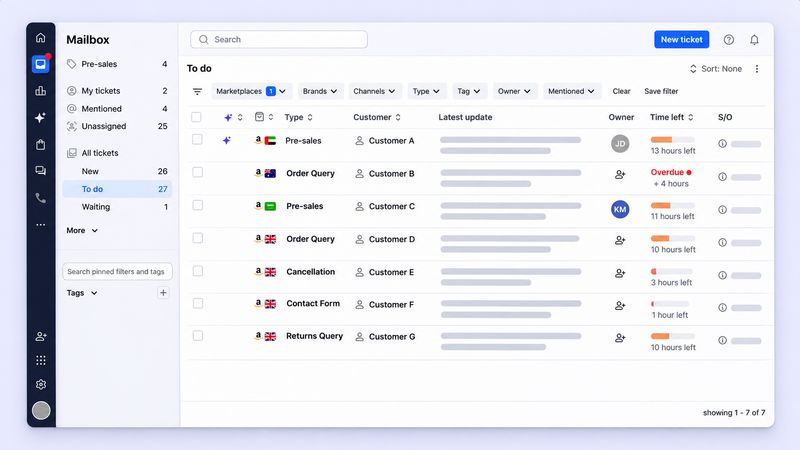
In eDesk platform data, product questions make up 12.9% of support tickets, so staff the pre-sale pages first. See how pre-sales support prioritizes those conversations.
For shoppers in other languages, translate incoming and outgoing messages so any agent can reply. eDesk AI Translate costs $21 per agent per month. Route complaints, legal questions and high-value orders to a native speaker.
 Where to start with live chat
Put chat on your product, cart and checkout pages first, with the order and customer history beside every conversation. Set an out-of-hours reply that captures a ticket, staff your peak hour with the capacity formula, and track chat-to-order rate alongside response time every week. Good eCommerce live chat support sits in the same inbox as your email and marketplace messages, so no customer gets a different answer on a different channel. For the wider plan, see our eCommerce customer service guide.
Frequently asked questions
1. Which live chat software is best for eCommerce?
The best fit shows the customer's order beside the chat, sits in the same inbox as your email and marketplace messages, and lets AI answer routine questions with a clean handoff. Compare tools on integrations, pricing model and data terms.
2. What is the best live chat for eCommerce stores?
For a single Shopify store, a native or app-store widget can be enough. For sellers on several channels, a helpdesk with built-in chat keeps every conversation and order in one place.
3. Does live chat need order data?
Yes. eCommerce live chat support needs order data for post-purchase questions. Without it, agents ask for order numbers and switch tabs, and simple questions take longer to resolve.
4. How many chats can one agent handle at once?
It depends on chat length and complexity. Measure your own average chat time and test 2 to 3 concurrent chats, then use the capacity formula to plan your peak hour.
5. Should live chat be on the checkout page?
Yes, if it answers the questions that stop orders, such as shipping costs, delivery times and returns. Avoid pop-ups that interrupt payment.
Key takeaways
eCommerce live chat support works when the order sits beside the chat.
Track first response time, resolution rate, chat CSAT and chat-to-order rate.
Staff peaks with: peak chats per hour / (concurrent chats x chats closed per slot per hour).
Capture out-of-hours and missed chats as tickets.
Keep chat in the same inbox as email and marketplace messages.
Start for free and add live chat to the same inbox as your marketplaces.
Author:
